SwatchMaticPRO
It will remain here for download, but new features will not regularly be added.
For those, I encourage you to try SHÄDZ, the successor app to SwatchMatic.
It can do most anything SwatchMatic can do, and more!***Satisfy your inner designer.People all around the world, including editors at Tested, c|net, and MakeUseOf, love SwatchMatic, and you will too.
It's a free, fun, new way to capture, combine and share the colors you need for your website, startup logo, or kitchen makeover.
Go pro.SwatchMaticPRO gives you all the fun of the free version, plus newly commissioned robot characters and one-touch exports to Photoshop, Illustrator and other Adobe applications.
Transition with ease.The pro version will automatically copy over all the palettes you've created in the free version, so don't worry about losing any of your favorites.
And keep on using all the other features you love in the free version .
.
.
See a color you like, grab it.
Whenever.
Wherever.Your Android's lens becomes a "Terminator" eye that can tell you the name of any color you point at.
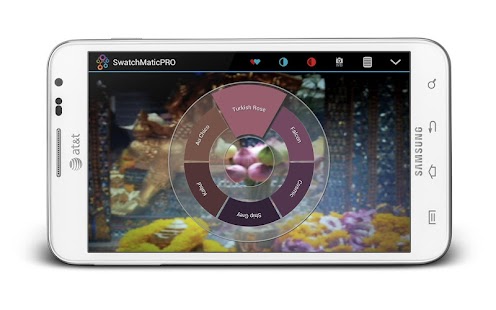
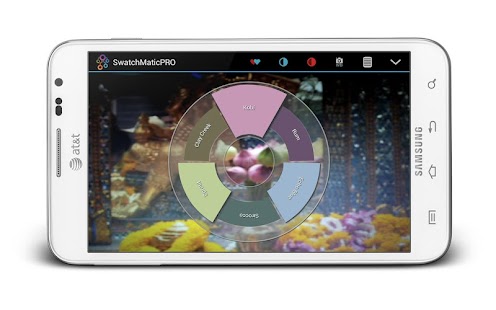
Harmonize effortlessly.In realtime, SwatchMatic shows you colors that nicely match the one you're sampling.
There's no need to take a photo and wait for the result.
Find analogs, complements, or triads, even the dominant colors in the scene.
Once you're happy with the combo, just touch to save it as a palette.
Your swatch book is always with you.
Are you a tweaker?
Tweak colors all you like.
Right on your Android.Easy sliders let you subtly edit the individual colors in the palette.
You don't have to stick to the color "rules," but you can if you want to.
You decide.
Dress robots in your colors and share them with the world.Palettes shouldn't be the bland things you see in paint stores.
They should be fun.
They should feature robots.
Share images of lovable robots wearing your colors, alongside all the values needed to recreate them anywhere.
Robots are fun, swatch files too, but sometimes plain text will do.Export out all your color names and values (in RGB, HSV, HEX, and even RAL Classic notation) as plain text for reuse anywhere — in other applications, at the paint store, the printing bureau, wherever.
FEATURES
☆ Augmented reality style UI lets you build color palettes in real time, on top of whatever you're viewing through your Android.
☆ Fun names are instantly assigned to your colors and palettes in English, German, Dutch, Italian, Spanish, French, Polish, Japanese or Chinese.
☆ Robots!
☆ Instant sharing of colors as text or images to Facebook, Twitter, or any social media app you have installed on your Android.
☆ Fast export to Adobe applications (read how here: http://www.appbaan.com/swatchmatic/user-guide-1/sharing_palettes_with_adobe_products/ ).
☆ Works with Android versions 2.2 and above.
☆ Detailed preferences to make your palettes look beautiful on any Android.
☆ And robots!
Did we mention the robots?
About SwatchMaticPRO
- Package name (App ID)
- com.appbaan.swatchmaticPRO
- Available on
- Google Play
- Price
- Free
- Version
- v1.82
- Developer
- OnlineWolves
Looking for the SwatchMaticPRO APK?
The safest way to get SwatchMaticPRO (com.appbaan.swatchmaticPRO) on your Android device is to install it directly from Google Play — you'll always get the latest official version, automatic updates, and no risk of modified or infected APK files from third-party sites.
Social Features
Connect and share with friends and the community.
Camera Features
Advanced camera features with editing capabilities.
Productivity Tools
Boost your productivity with powerful tools and features.
See SwatchMaticPRO in Action

Frequently Asked Questions
Is SwatchMaticPRO free?
Yes, SwatchMaticPRO is free to download and install on Android through Google Play.
How do I install SwatchMaticPRO on Android?
Open Google Play on your Android phone or tablet, search for SwatchMaticPRO by OnlineWolves or tap the Google Play button on this page, then tap Install. The app downloads and installs automatically.
What is com.appbaan.swatchmaticPRO?
com.appbaan.swatchmaticPRO is the App ID (package name) of SwatchMaticPRO on Google Play. Every Android app has a unique package name, and it is the safest way to verify you are installing the official app.
Is SwatchMaticPRO safe to download?
Installing SwatchMaticPRO from Google Play is the safest option: you get the official version published by OnlineWolves, verified by Google Play Protect, with automatic updates. Avoid APK files from unofficial third-party sites.

Get SwatchMaticPRO Today
SwatchMaticPRO for Android — free download on Google Play.
Compatible with Android phones and tablets — available on Google Play.
Ask AI about this app
Get instant answers about features, tips and more from popular AI assistants.